🗄️ The Broken Link Database
SEARCH EVERY BROKEN LINK OUR CRAWLER HAS INDEXED ACROSS THE PUBLIC WEB. FILTER BY SOURCE DOMAIN OR DESTINATION DOMAIN TO SCOUT PUBLISHERS AND AUDIT DEAD URLS.
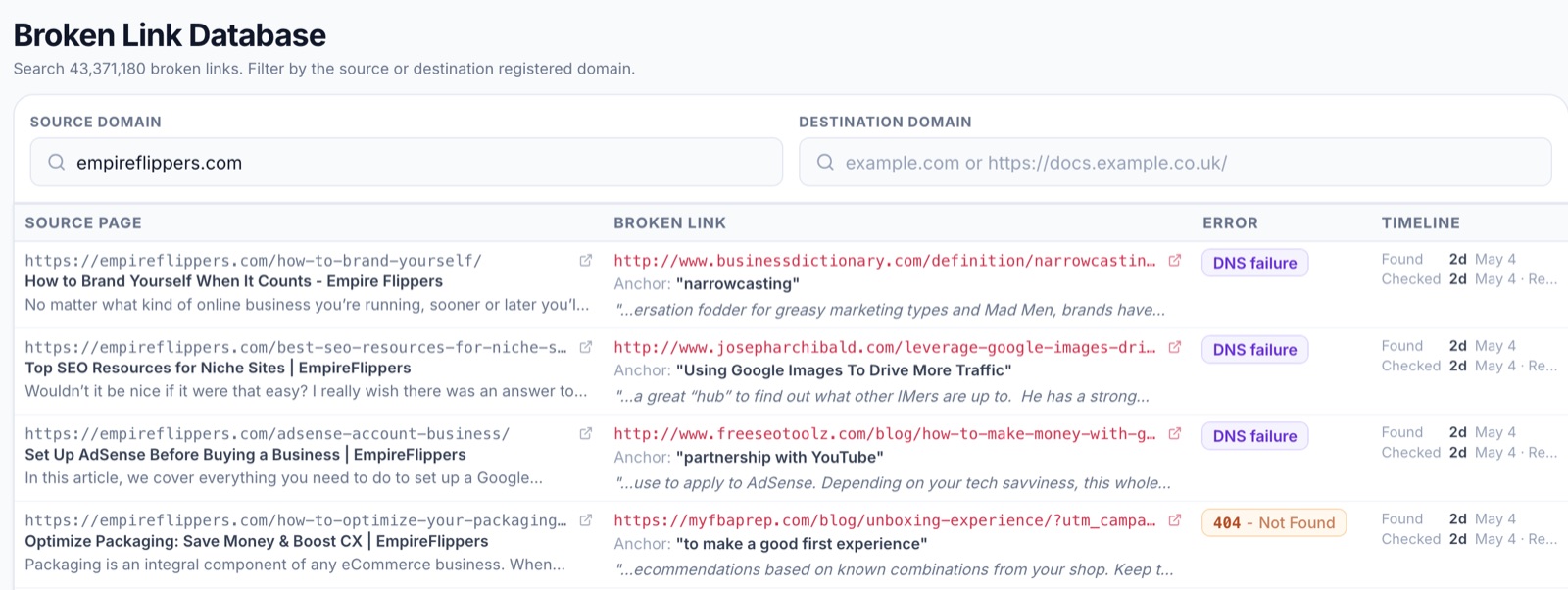
Most broken-link tools only show you what got crawled for your audit. The bigger picture (every broken link our crawler has ever indexed across all customer audits) sits behind the Broken Link Database tab. Use it as a research tool when you want to study a specific publisher or follow your own dead URLs into the wild.
Filter by either side of the link.
- 🌐 Source Domain 👉 the site that contains the broken link (e.g.
empireflippers.com). Use this to study one publisher. - 🎯 Destination Domain 👉 the broken URL’s domain (e.g.
docs.example.co.uk). Use this to find pages still pointing at a dead resource you care about.
Each row shows the source page, the broken link itself, anchor text, surrounding sentence, error type (DNS failure, 404, etc.), and a timeline of when the link was found and last checked.
This is research, not your scored opportunity list. Rows here aren’t matched against your pages, and the score column is intentionally absent. For matched, scored opportunities, use the Opportunities tab instead.
Tips 💡
- 🔭 Use Source Domain to scout a publisher before pitching guest content. A site with hundreds of indexed broken outbound links has citation gaps to fill.
- 🪦 Use Destination Domain with your own dead URLs to find pages still linking to retired content. Those are easy redirects to recover.
- 📅 Check the Checked date. Recently re-checked rows are more reliable than stale ones.
- 🤐 The database doesn’t include data from sites that opted out via robots or our bot policy.