STEP 4
🔎 Filtering and sorting opportunities
NARROW A LONG LIST DOWN TO THE ROWS ACTUALLY WORTH YOUR TIME, USING SCORE, BDR, RATING, ERROR TYPE, STATUS, AND FREE-TEXT SEARCH.
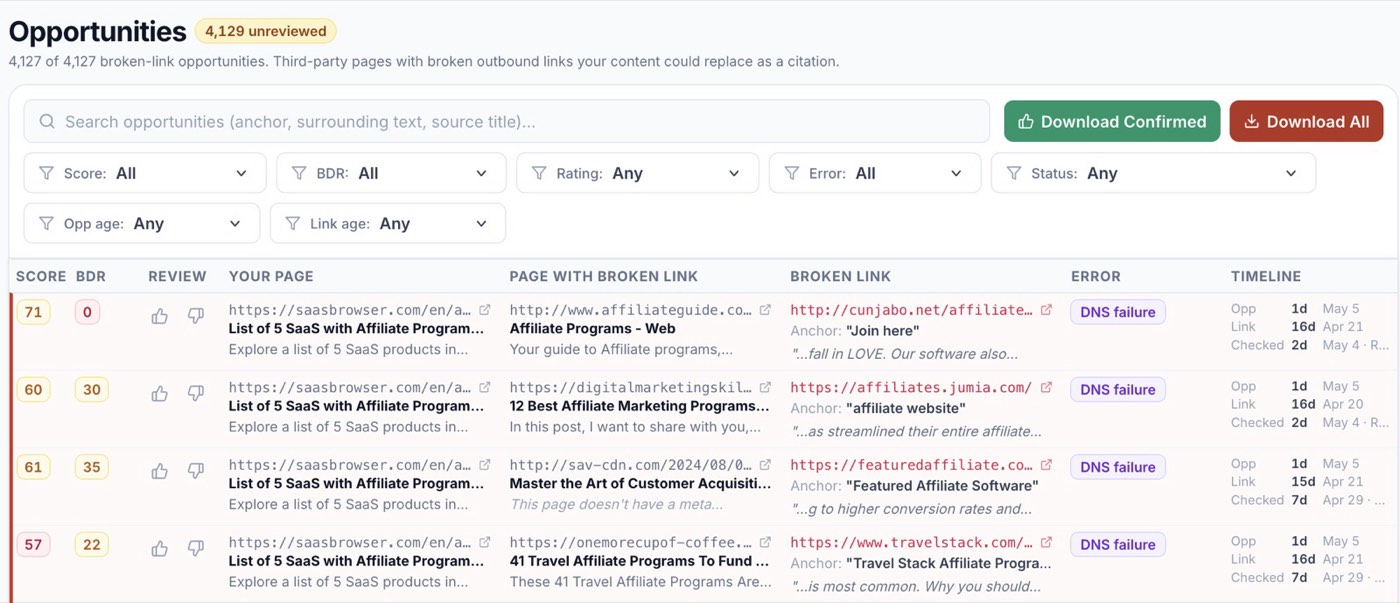
A fresh audit can produce thousands of opportunities. The score column already does most of the prioritization, but you’ll usually want to slice further: by quality, by domain rating, by what kind of broken link it is, or by topic. The filter row above the table is built for exactly that.
Stack as many filters as you want. The result count at the top updates live (4,329 unreviewed, 212 confirmed, etc.).
- 🟧 Score 👉 minimum match score. Set it to filter out the long tail.
- 🔵 BDR 👉 minimum domain rating for the source page. Useful when you only care about higher-authority sites.
- 👍👎 Rating 👉 your own thumbs. Filter to “Unrated” to keep moving, or “Up” to review confirmed picks.
- ⚠️ Error 👉 type of breakage. DNS failure, 404, redirect loop, etc. Some teams prefer working only true 404s.
- 🟢🔴 Status 👉 whether the opportunity has been reviewed, exported, and so on.
- ⏱️ Opp age 👉 how recently the opportunity was discovered.
- 🕰️ Link age 👉 how recently the broken link itself was last seen alive. Recently-broken links are often easiest because the source site hasn’t yet noticed.
- 🔍 Free-text search 👉 the search box scans anchor text, surrounding sentence, and source page title together. Use it for topic-specific sweeps (“affiliate”, “pricing”, “tutorial”).
Click any column header to sort. The default is Score descending, which is almost always the right starting point.
Tips 💡
- 🧵 Pair BDR ≥ 50 with Score ≥ 70 for a tight, high-quality starting list.
- 🆕 Sort by Link age ascending to catch links that broke recently. The source site is more likely to be actively maintained, so the lead is fresher.
- 🔁 Filters persist in the URL, so you can bookmark a saved view.
- 🧹 Switching the Rating filter to “Down” lets you audit past rejections; sometimes a thumbs-down was wrong, and a re-rate will improve future picks.