🎯 The Opportunities table
HOW THE OPPORTUNITIES TABLE WORKS. EACH ROW IS A THIRD-PARTY PAGE WITH A BROKEN OUTBOUND LINK YOUR PAGE CAN REPLACE AS A CITATION, RANKED BY FIT SCORE.
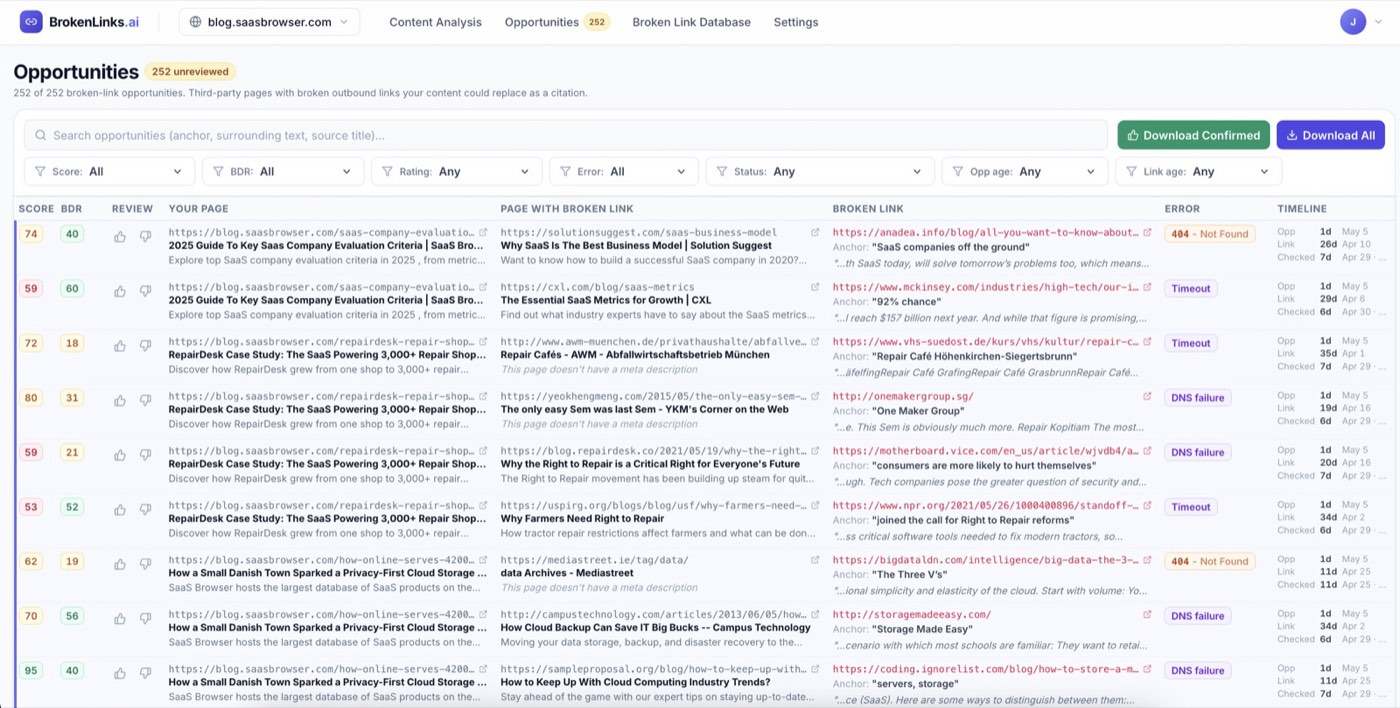
The Opportunities tab is where the broken-link work actually happens. Every row is a candidate match between one of your pages and one third-party page that has a broken outbound link.
A useful match is the result of three things lining up: the source page is worth being cited from, the dead destination matched the topic of one of your pages, and your page is a believable substitute. The score column rolls all of that into a single number so you can read the table top-down and trust that the best stuff floats up.
How matches are found 🧠
Two stages, working back-to-back.
Stage 1: topical match. We read each page on your site and the broken-link contexts in our index (anchor text, the sentence around the link, the source page title, and its meta description) and group them by topic. For every one of your pages, we pull the broken links that talk about the same thing. This is the “is this even on-topic?” pass: it gets us from “billions of broken links on the web” down to a candidate shortlist that’s actually relevant to your content.
Stage 2: relevance scoring. Being on-topic isn’t enough. A broken link can be about the same subject as your page without your page actually being a credible citation for it. So each candidate from stage 1 gets scored for fit: does your page genuinely answer what the dead link was being cited for? The score column you see in the table is that fit score, on a 0-100 scale. Anything below the confidence threshold is filtered out, so the rows you see have already passed two gates.
The same broken URL can show up matched to several different source pages, because each source page is a separate citation opportunity. And a single page of yours can match many broken links, because there are many places it could plausibly slot in.
Reading a row 👀
Read each row left to right.
- 🟧 Score 👉 the relevance fit score. Higher = better fit between your page and the broken link’s context.
- 🔵 BDR 👉 a domain-rating-style estimate for the source domain (the page with the broken link). Higher domain ratings are usually more valuable links.
- 👍👎 Review 👉 your own thumbs rating, which feeds back into the matcher. See Rating matches.
- 🟪 Your Page 👉 the page on your site being proposed as the replacement, with title and description.
- 🟨 Page With Broken Link 👉 the third-party page that currently links to a dead resource.
- 🟥 Broken Link 👉 the dead URL itself, plus the anchor text and the surrounding sentence so you can see the context.
- ⚠️ Error 👉 what went wrong with the dead link (DNS failure, 404 Not Found, redirect loop, etc.).
- ⏱️ Timeline 👉 when the opportunity was first found, and when each side was last checked.
Click any URL to open it in a new tab. The 🔗 icon next to a URL is just an “open in new tab” affordance; the row itself isn’t a link.
Tips 💡
- 🥇 Start at the top. Score is already doing the prioritization for you.
- 🧠 Read the surrounding sentence before clicking. It tells you whether your page genuinely fits the context.
- 🌐 The same broken URL across many source pages is normal, not a duplicate bug.
- 🚫 If the source page is obviously low quality, thumb it down. The next section explains why that matters.