STEP 9
💳 Your subscription
SEE YOUR CURRENT PLAN, MONTHLY OPPORTUNITY ALLOWANCE, RENEWAL DATE, AND MANAGE PAYMENT, PLAN CHANGES, AND INVOICES THROUGH THE SECURE BILLING PORTAL.
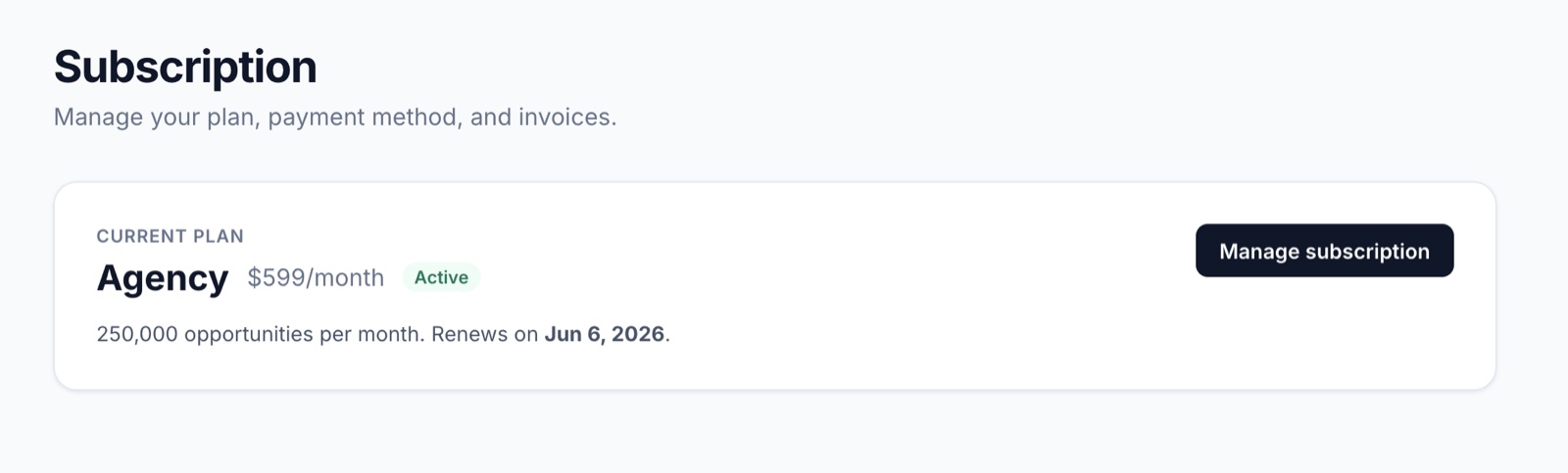
The Subscription page (under Settings) keeps the billing surface short and honest: one card showing exactly where you stand, with a single button to manage everything else.
- 🏷️ Current plan 👉 the plan name (e.g. Agency) and monthly price.
- 🟢 Status 👉 Active, Past due, or Canceled.
- 🔢 Monthly allowance 👉 how many opportunities your plan includes per month (e.g. 250,000 opportunities per month).
- 📅 Renewal date 👉 when the next charge happens and the allowance resets.
- ⚙️ Manage subscription 👉 opens the secure billing portal where you can change plan, update card, or download invoices.
If you need a higher allowance, more sites, or an annual plan, the manage button is the one-stop shop. Plan changes apply immediately and are pro-rated.
Tips 💡
- 📨 We email you well before any limit is hit, so you’re not surprised mid-month.
- 🧾 Invoices and receipts live inside the Manage subscription portal, not the app, so you can give your accountant direct access without exposing the rest of your account.
- 🔄 Downgrades take effect at the end of the current period, so you don’t lose access you’ve already paid for.
- ⛔ Canceling pauses new opportunities but doesn’t delete your data. Restart any time.